Method
You can set or get the line’s transparency using the `Transparency` property of the `LineFormat` object. The value ranges from 0.0 (opaque) to 1.0 (fully transparent).
shp2=sht.api.Shapes.AddLine(100, 125, 400, 125) #Second line segment
shp2.Line.Weight=8 #Line width
shp2.Line.ForeColor.RGB=xw.utils.rgb_to_int((255,0,0)) #Red
shp2.Line.Transparency=0.7 #Transparency 0.7
Sample Code
#Line properties - Transparency

import xlwings as xw    #Import xlwings package

app=xw.App()
bk=app.books.active   #Get the active workbook
sht=bk.sheets.active    #Get the active worksheet

sht.api.Shapes.AddShape(9, 150, 50, 200, 100)    #Elliptical area
shp=sht.api.Shapes.AddLine(100, 75, 400, 75)    #First line segment
shp.Line.Weight=8    #Line width
shp.Line.ForeColor.RGB=xw.utils.rgb_to_int((255,0,0))    #Red

shp2=sht.api.Shapes.AddLine(100, 125, 400, 125)    #Second line segment
shp2.Line.Weight=8    #Line width
shp2.Line.ForeColor.RGB=xw.utils.rgb_to_int((255,0,0))    #Red
shp2.Line.Transparency=0.7    #Transparency 0.7

#bk.save()
#bk.close()
#app.kill()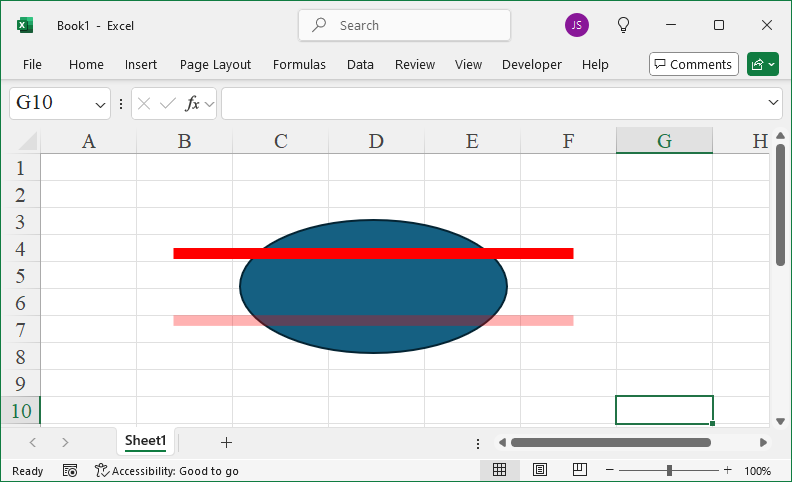
Leave a Reply