Method
You can apply a pattern fill to a line object using the `Pattern` property of the `LineFormat` object. This property sets or returns an `MsoPatternType` enumeration value, which defines the pattern of the fill.
|
Name |
Value |
Description |
|
msoPatternCross |
51 |
Crosshatch pattern |
|
msoPatternDarkDownwardDiagonal |
15 |
Dark downward diagonal |
|
msoPatternDarkHorizontal |
13 |
Dark horizontal lines |
|
msoPatternDarkUpwardDiagonal |
16 |
Dark upward diagonal |
|
msoPatternDarkVertical |
14 |
Dark vertical lines |
|
msoPatternHorizontal |
49 |
Horizontal lines |
|
msoPatternVertical |
50 |
Vertical lines |
|
msoPatternSmallGrid |
23 |
Small grid pattern |
|
msoPatternWave |
48 |
Wavy lines |
|
…… |
|
|
shp=sht.api.Shapes.AddLine(100, 55, 400, 125)
shp.Line.Weight=8
shp.Line.Pattern=16 #Set pattern fill for line segments
Sample Code
#Line Properties - Pattern Fill

import xlwings as xw    #Import xlwings package

app=xw.App()
bk=app.books.active   #Get the active workbook
sht=bk.sheets.active    #Get the active worksheet

shp=sht.api.Shapes.AddLine(100, 55, 400, 125)
shp.Line.Weight=8
shp.Line.Pattern=16    #Set pattern fill for line segments

#bk.save()
#bk.close()
#app.kill()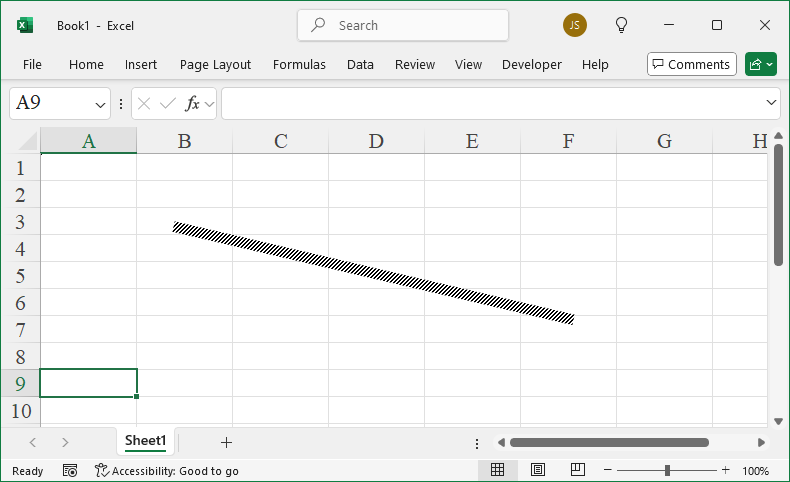
Leave a Reply