Archive

How To Refresh a Pivot Table Using xlwings?

Method

def modify_data():

    #Modify data source

    sht_data.range(‘F2′).value=’China’


def update():

    #Refresh pivot table

    pvt=sht_pvt.api.PivotTables(‘Pivot’)

    pvt.RefreshTable()

Sample Code

#Refresh Pivot Table

import xlwings as xw    #Import xlwings
import os    #Import os

root = os.getcwd()    #Get current path
#Create Excel application window, visible, no workbook added
app=xw.App(visible=True, add_book=False)
#Open data file, writable
bk=app.books.open(fullname=root+r'\Pivot.xlsx',read_only=False)
#Get data source worksheet
sht_data=bk.sheets.active
#Data cell range
rng_data=sht_data.api.Range('A1').CurrentRegion
#Create a new worksheet for the pivot table
sht_pvt=bk.sheets.add()
sht_pvt.name='Pivot Table'
    
def create_pivot_table():
    #Location of data
    rng_data=sht_data.api.Range('A1').CurrentRegion
    #Location of pivot table
    rng_pvt=sht_pvt.api.Range('A1')

    #Create pivot table cache
    pvc=bk.api.PivotCaches().Create(\
          SourceType=xw.constants.PivotTableSourceType.xlDatabase,\
          SourceData=rng_data)
    #Create pivot table
    pvt=pvc.CreatePivotTable(\
          TableDestination=rng_pvt,\
          TableName='Pivot')

    #Set fields
    pvt.PivotFields('Category').Orientation=\
        xw.constants.PivotFieldOrientation.xlPageField    #Page fields
    pvt.PivotFields('Category').Position=1
    pvt.PivotFields('Product').Orientation=\
        xw.constants.PivotFieldOrientation.xlColumnField    #Column fields
    pvt.PivotFields('Product').Position=1
    pvt.PivotFields('Origin').Orientation=\
        xw.constants.PivotFieldOrientation.xlRowField    #Row fields
    pvt.PivotFields('Origin').Position=1
    pvt.PivotFields('Amount').Orientation=\
        xw.constants.PivotFieldOrientation.xlDataField    #Value fields

def modify_data():
    #Modify data source
    sht_data.range('F2').value='China'

def update():
    #Refresh pivot table
    pvt=sht_pvt.api.PivotTables('Pivot')
    pvt.RefreshTable()


create_pivot_table()
modify_data()
update()

#bk.save()
#bk.close()
#app.kill()
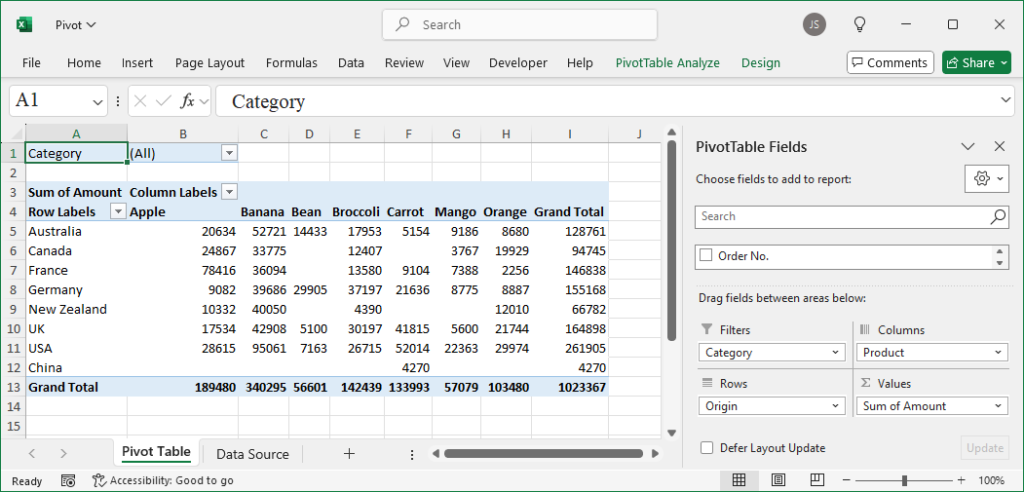
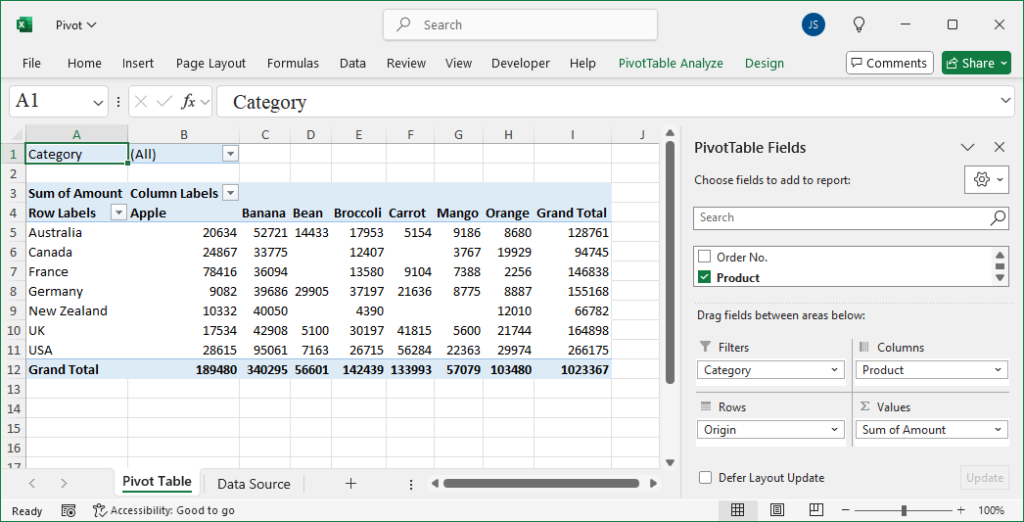
Refresh a Pivot Table Using xlwings

How To Reference a Pivot Table Using xlwings?

Method

def ref_pivot_table():

    #Pivot table reference

    print(sht_pvt.api.PivotTables().Count)

    print(sht_pvt.api.PivotTables(1).Name)    #Reference by index number

    print(sht_pvt.api.PivotTables(‘Pivot’).Name)    #Reference by name

Sample Code

#Pivot Table References

import xlwings as xw    #Import xlwings
import os    #Import os

root = os.getcwd()    #Get current path
#Create Excel application window, visible, no workbook added
app=xw.App(visible=True, add_book=False)
#Open data file, writable
bk=app.books.open(fullname=root+r'\Pivot.xlsx',read_only=False)
#Get data source worksheet
sht_data=bk.sheets.active
#Data cell range
rng_data=sht_data.api.Range('A1').CurrentRegion
#Create a new worksheet for the pivot table
sht_pvt=bk.sheets.add()
sht_pvt.name='Pivot Table'
    
def create_pivot_table():
    #Location of data
    rng_data=sht_data.api.Range('A1').CurrentRegion
    #Location of pivot table
    rng_pvt=sht_pvt.api.Range('A1')

    #Create pivot table cache
    pvc=bk.api.PivotCaches().Create(\
          SourceType=xw.constants.PivotTableSourceType.xlDatabase,\
          SourceData=rng_data)
    #Create pivot table
    pvt=pvc.CreatePivotTable(\
          TableDestination=rng_pvt,\
          TableName='Pivot')

    #Set fields
    pvt.PivotFields('Category').Orientation=\
        xw.constants.PivotFieldOrientation.xlPageField    #Page fields
    pvt.PivotFields('Category').Position=1
    pvt.PivotFields('Product').Orientation=\
        xw.constants.PivotFieldOrientation.xlColumnField    #Column fields
    pvt.PivotFields('Product').Position=1
    pvt.PivotFields('Origin').Orientation=\
        xw.constants.PivotFieldOrientation.xlRowField    #Row fields
    pvt.PivotFields('Origin').Position=1
    pvt.PivotFields('Amount').Orientation=\
        xw.constants.PivotFieldOrientation.xlDataField    #Value fields

def ref_pivot_table():
    #Pivot table reference
    print(sht_pvt.api.PivotTables().Count)
    print(sht_pvt.api.PivotTables(1).Name)    #Reference by index number
    print(sht_pvt.api.PivotTables('Pivot').Name)    #Reference by name

create_pivot_table()
ref_pivot_table()

#bk.save()
#bk.close()
#app.kill()
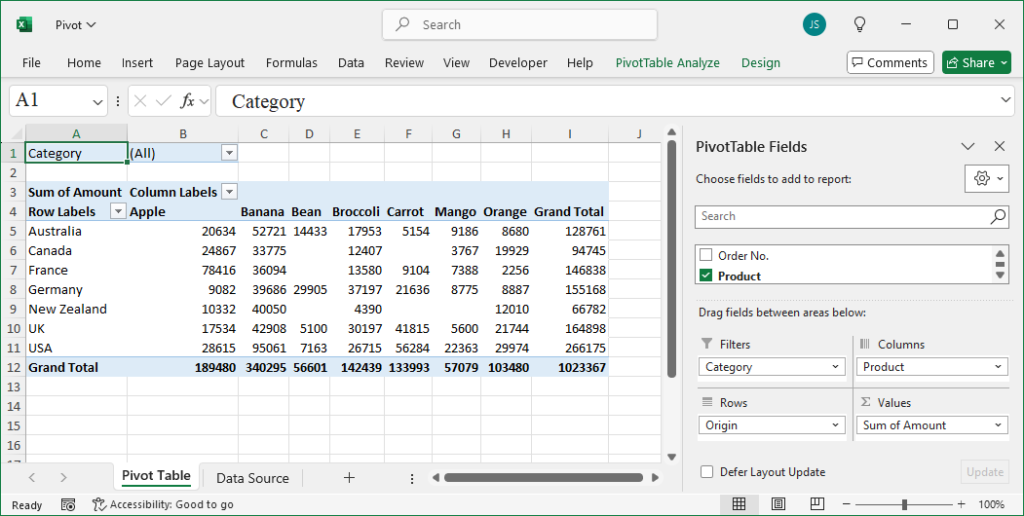
Reference a Pivot Table Using xlwings

How To Create a Pivot Table using Cache Using xlwings?

Method

def create_pivot_table():

    #Location of pivot table

    rng_pvt=sht_pvt.api.Range(‘A1’)

    #Create pivot table cache

    pvc=bk.api.PivotCaches().Create(\

          SourceType=xw.constants.PivotTableSourceType.xlDatabase,\

          SourceData=rng_data)

    #Create pivot table

    pvt=pvc.CreatePivotTable(\

          TableDestination=rng_pvt,\

          TableName=’Pivot’)


    #Set fields

    pvt.PivotFields(‘Category’).Orientation=\

        xw.constants.PivotFieldOrientation.xlPageField    #Page fields

    pvt.PivotFields(‘Category’).Position=1

    pvt.PivotFields(‘Product’).Orientation=\

        xw.constants.PivotFieldOrientation.xlColumnField    #Column fields

    pvt.PivotFields(‘Product’).Position=1

    pvt.PivotFields(‘Origin’).Orientation=\

        xw.constants.PivotFieldOrientation.xlRowField    #Row fields

    pvt.PivotFields(‘Origin’).Position=1

    pvt.PivotFields(‘Amount’).Orientation=\

        xw.constants.PivotFieldOrientation.xlDataField    #Value fields

Sample Code

#Create Pivot Table with Cache

import xlwings as xw    #Import xlwings
import os    #Import os

root = os.getcwd()    #Get current path
#Create Excel application window, visible, no workbook added
app=xw.App(visible=True, add_book=False)
#Open data file, writable
bk=app.books.open(fullname=root+r'\Pivot.xlsx',read_only=False)
#Get data source worksheet
sht_data=bk.sheets.active
#Data cell range
rng_data=sht_data.api.Range('A1').CurrentRegion
#Create a new worksheet for the pivot table
sht_pvt=bk.sheets.add()
sht_pvt.name='Pivot Table'

def create_pivot_table():
    #Location of pivot table
    rng_pvt=sht_pvt.api.Range('A1')
    #Create pivot table cache
    pvc=bk.api.PivotCaches().Create(\
          SourceType=xw.constants.PivotTableSourceType.xlDatabase,\
          SourceData=rng_data)
    #Create pivot table
    pvt=pvc.CreatePivotTable(\
          TableDestination=rng_pvt,\
          TableName='Pivot')

    #Set fields
    pvt.PivotFields('Category').Orientation=\
        xw.constants.PivotFieldOrientation.xlPageField    #Page fields
    pvt.PivotFields('Category').Position=1
    pvt.PivotFields('Product').Orientation=\
        xw.constants.PivotFieldOrientation.xlColumnField    #Column fields
    pvt.PivotFields('Product').Position=1
    pvt.PivotFields('Origin').Orientation=\
        xw.constants.PivotFieldOrientation.xlRowField    #Row fields
    pvt.PivotFields('Origin').Position=1
    pvt.PivotFields('Amount').Orientation=\
        xw.constants.PivotFieldOrientation.xlDataField    #Value fields

create_pivot_table()

#bk.save()
#bk.close()
#app.kill()
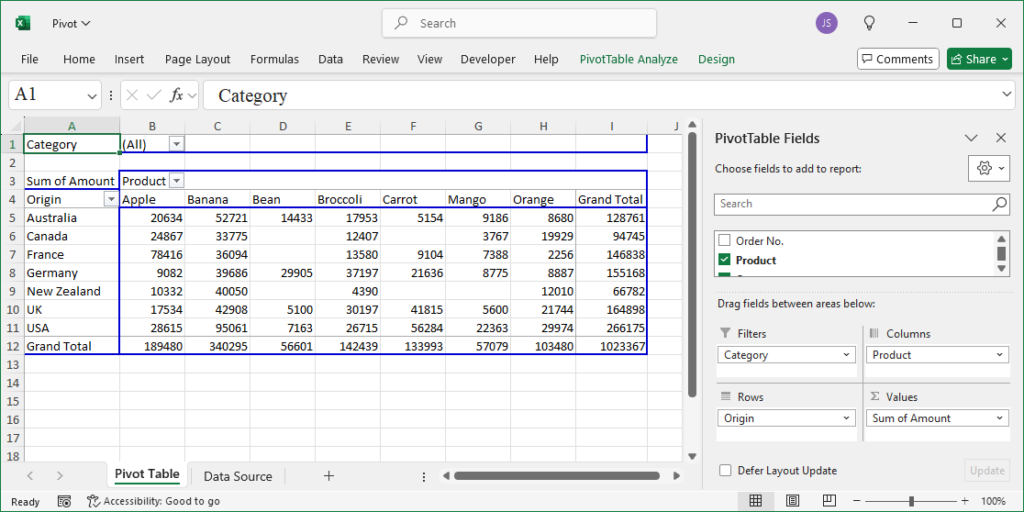
Create a Pivot Table using Cache Using xlwings

How To Create a Pivot Table using the PivotTableWizard Method Using xlwings?

Method

def create_pivot_table():

    #Create pivot table

    pvt=sht_pvt.api.PivotTableWizard(\

        SourceType=xw.constants.PivotTableSourceType.xlDatabase,\

        SourceData=rng_data)

    pvt.Name=’Pivot’


    #Set fields

    pvt.PivotFields(‘Category’).Orientation=\

        xw.constants.PivotFieldOrientation.xlPageField    #Page fields

    pvt.PivotFields(‘Category’).Position=1

    pvt.PivotFields(‘Product’).Orientation=\

        xw.constants.PivotFieldOrientation.xlColumnField    #Column fields

    pvt.PivotFields(‘Product’).Position=1

    pvt.PivotFields(‘Origin’).Orientation=\

        xw.constants.PivotFieldOrientation.xlRowField    #Row fields

    pvt.PivotFields(‘Origin’).Position=1

    pvt.PivotFields(‘Amount’).Orientation=\

        xw.constants.PivotFieldOrientation.xlDataField    #Value fields

Sample Code

#Create Pivot Table using PivotTableWizard Method

import xlwings as xw    #Import xlwings
import os    #Import os

root = os.getcwd()    #Get current path
#Create Excel application window, visible, no workbook added
app=xw.App(visible=True, add_book=False)
#Open data file, writable
bk=app.books.open(fullname='Pivot.xlsx',read_only=False)
#Get data source worksheet
sht_data=bk.sheets.active
#Data cell range
rng_data=sht_data.api.Range('A1').CurrentRegion
#Create a new worksheet for the pivot table
sht_pvt=bk.sheets.add()
sht_pvt.name='Pivot Table'

def create_pivot_table():
    #Create pivot table
    pvt=sht_pvt.api.PivotTableWizard(\
        SourceType=xw.constants.PivotTableSourceType.xlDatabase,\
        SourceData=rng_data)
    pvt.Name='Pivot'

    #Set fields
    pvt.PivotFields('Category').Orientation=\
        xw.constants.PivotFieldOrientation.xlPageField    #Page fields
    pvt.PivotFields('Category').Position=1
    pvt.PivotFields('Product').Orientation=\
        xw.constants.PivotFieldOrientation.xlColumnField    #Column fields
    pvt.PivotFields('Product').Position=1
    pvt.PivotFields('Origin').Orientation=\
        xw.constants.PivotFieldOrientation.xlRowField    #Row fields
    pvt.PivotFields('Origin').Position=1
    pvt.PivotFields('Amount').Orientation=\
        xw.constants.PivotFieldOrientation.xlDataField    #Value fields


create_pivot_table()

#bk.save()
#bk.close()
#app.kill()
Create a Pivot Table using the PivotTableWizard Method Using xlwings