Archive

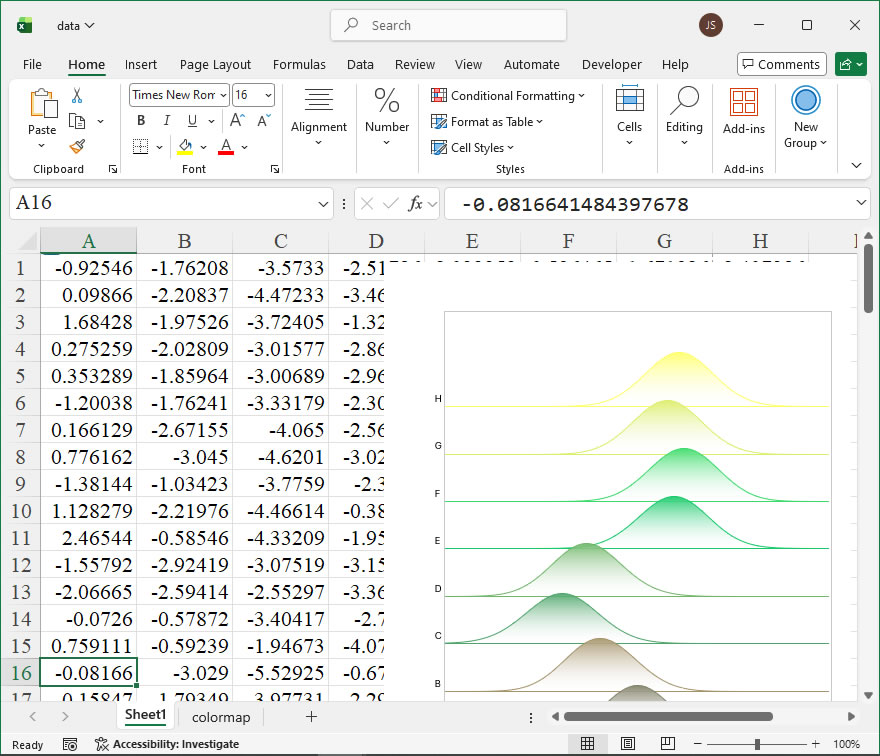
How To Create New Chart: Fill The Area Between Two Lines Using xlwings?

Example

Code

import xlwings as xw
import os

def set_style(cht):
    cht.ChartArea.Format.Line.Visible=False
    cht.PlotArea.Format.Fill.Visible = False
    cht.PlotArea.Format.Line.Visible = True
    cht.PlotArea.Format.Line.ForeColor.RGB=xw.utils.rgb_to_int((200,200,200))
    #cht.PlotArea.Format.Line.ForeColor.ObjectThemeColor = msoThemeColorText1
    ax1 = cht.Axes(1)
    ax2 = cht.Axes(2)
    ax1.HasTitle = True
    ax1.AxisTitle.Text = 'Categories'
    ax1.AxisTitle.Font.Size = 10
    ax1.TickLabels.Font.Size = 8
    #ax1.TickLabels.NumberFormat = '0.00'
    ax1.HasMajorGridlines = False
    ax2.HasTitle = True
    ax2.AxisTitle.Text = 'Values'
    ax2.AxisTitle.Font.Size = 10
    ax2.TickLabels.Font.Size = 8
    ax2.HasMajorGridlines = False
    cht.HasTitle = True
    #cht.ChartTitle.Caption = 'Plot'
    #cht.ChartTitle.Font.Size = 12


root=os.getcwd()
app=xw.App(visible=True,add_book=False)
wb=app.books.open(root+r'/data.xlsx',read_only=False)
sht=wb.sheets('Sheet1')
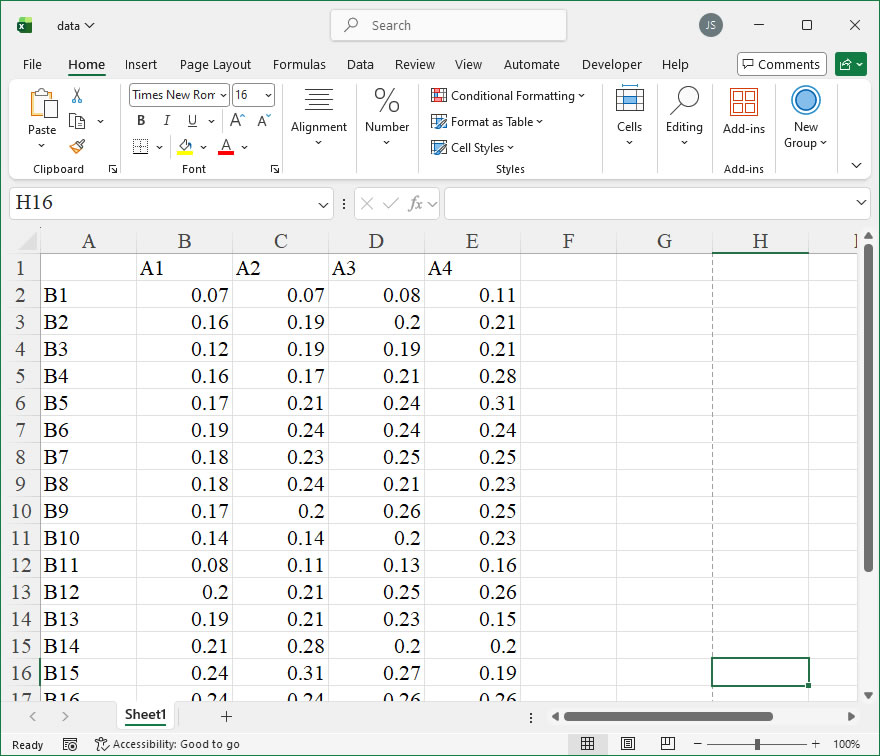
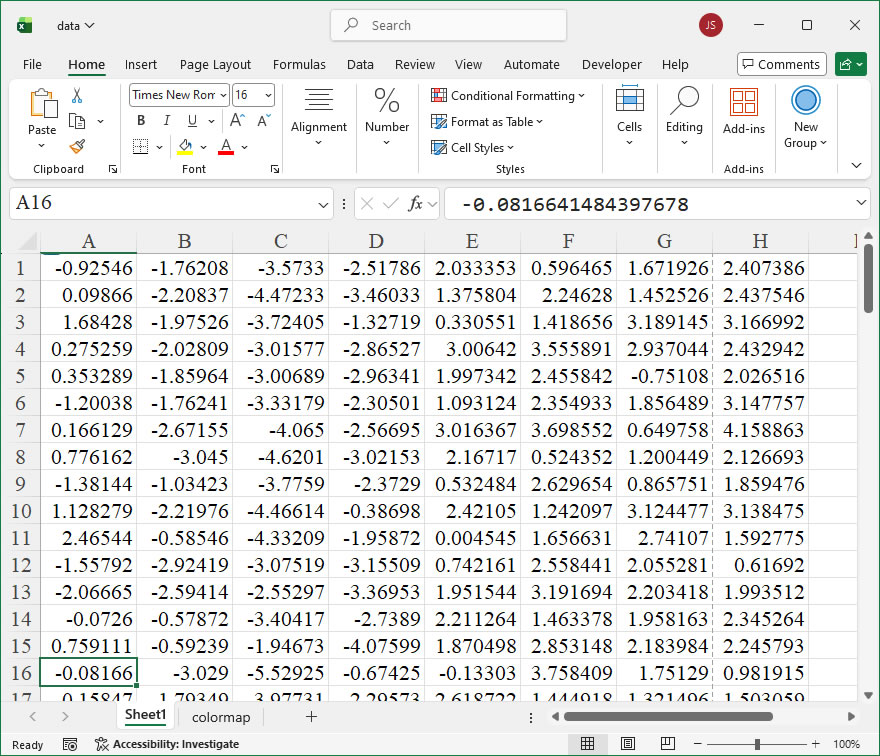
data=sht.range('A1:C100').value
app.kill()

from comtypes.client import CreateObject
app2=CreateObject("Excel.Application")
app2.Visible=True
app2.ScreenUpdating=False
wb2=app2.Workbooks.Open(root+r'/data.xlsx')
sht2=wb2.Sheets('Sheet1')

shp=sht2.Shapes.AddChart2()
shp.Left=20
cht=shp.Chart
cht.ChartType=-4169
ax1=cht.Axes(1)
ax2=cht.Axes(2)
ax1.MinimumScale=0
ax1.MaximumScale=101
ax2.MinimumScale=0
ax2.MaximumScale=120

set_style(cht)

cht.SeriesCollection().NewSeries()

pt=[[0 for _ in range(2)] for _ in range(201)]
for i in range(100):
    pt[i][0]=shape_x(cht,100-i)
    pt[i][1]=shape_y(cht,data[100-i-1][1])
for i in range(100,200):
    pt[i][0]=shape_x(cht,i-100)
    pt[i][1]=shape_y(cht,data[i-100][2])
pt[200][0]=pt[0][0]
pt[200][1]=pt[0][1]

shp=cht.Shapes.AddPolyline(pt)
shp.Fill.ForeColor.RGB=xw.utils.rgb_to_int((76,200,132))
shp.Line.Visible=False
shp.Fill.Transparency=0.3

app2.ScreenUpdating=True

#wb2.Save()
#os.system('taskkill /f /im EXCEL.EXE')

How To Create Custom Inverted Triangle Column Chart Using xlwings?

Example

Code

import xlwings as xw
import os

def set_style(cht):
    cht.ChartArea.Format.Line.Visible=False
    cht.PlotArea.Format.Fill.Visible = False
    cht.PlotArea.Format.Line.Visible = True
    cht.PlotArea.Format.Line.ForeColor.RGB=xw.utils.rgb_to_int((200,200,200))
    #cht.PlotArea.Format.Line.ForeColor.ObjectThemeColor = msoThemeColorText1
    ax1 = cht.Axes(1)
    ax2 = cht.Axes(2)
    ax1.HasTitle = True
    ax1.AxisTitle.Text = 'Categories'
    ax1.AxisTitle.Font.Size = 10
    ax1.TickLabels.Font.Size = 8
    #ax1.TickLabels.NumberFormat = '0.00'
    ax1.HasMajorGridlines = False
    ax2.HasTitle = True
    ax2.AxisTitle.Text = 'Values'
    ax2.AxisTitle.Font.Size = 10
    ax2.TickLabels.Font.Size = 8
    ax2.HasMajorGridlines = False
    cht.HasTitle = True
    #cht.ChartTitle.Caption = 'Plot'
    #cht.ChartTitle.Font.Size = 12

root=os.getcwd()
app=xw.App(visible=True,add_book=False)
wb=app.books.open(root+r'/data.xlsx',read_only=False)
sht=wb.sheets('Sheet1')
data=sht.range('A2:B7').value
app.kill()

from comtypes.client import CreateObject
app2=CreateObject("Excel.Application")
app2.Visible=True
app2.ScreenUpdating=False
wb2=app2.Workbooks.Open(root+r'/data.xlsx')
sht2=wb2.Sheets('Sheet1')

shp=sht2.Shapes.AddChart2()
shp.Left=20
cht=shp.Chart
cht.ChartType=-4169
ax1=cht.Axes(1)
ax2=cht.Axes(2)
ax1.MinimumScale=0
ax1.MaximumScale=7
ax2.MinimumScale=0
ax2.MaximumScale=0.22

set_style(cht)

cht.SeriesCollection().NewSeries()

pt=[[0 for _ in range(2)] for _ in range(4)]
for i in range(6):
    pt[0][0]=shape_x(cht,i+1-0.25)
    pt[0][1]=shape_y(cht,data[i][1])
    pt[1][0]=shape_x(cht,i+1)
    pt[1][1]=shape_y(cht,0)
    pt[2][0]=shape_x(cht,i+1+0.25)
    pt[2][1]=shape_y(cht,data[i][1])
    pt[3][0]=pt[0][0]
    pt[3][1]=pt[0][1]
    shp=cht.Shapes.AddPolyline(pt)
    shp.Fill.ForeColor.RGB=xw.utils.rgb_to_int((255,192,0))
    shp.Fill.TwoColorGradient(2,1)
    shp.Fill.BackColor.RGB=xw.utils.rgb_to_int((240,240,240))
    shp.Line.Visible=False

    x=shape_x(cht,i+1-0.35)
    y=shape_y(cht,data[i][1]+0.025)
    w=cht.PlotArea.InsideWidth/(ax1.MaximumScale-ax1.MinimumScale)*1
    h=cht.PlotArea.InsideHeight/(ax2.MaximumScale-ax2.MinimumScale)*0.04
    shp2=cht.Shapes.AddLabel(1,x,y,w,h)
    shp2.TextFrame.Characters().Text=str(data[i][1])
    shp2.TextFrame.Characters().Font.Color=xw.utils.rgb_to_int((0,0,0))
    shp2.TextFrame.Characters().Font.Size=8

app2.ScreenUpdating=True

#wb2.Save()
#os.system('taskkill /f /im EXCEL.EXE')

How To Create Custom Triangle Column Chart Using xlwings?

Example

Code

import xlwings as xw
import os

def set_style(cht):
    cht.ChartArea.Format.Line.Visible=False
    cht.PlotArea.Format.Fill.Visible = False
    cht.PlotArea.Format.Line.Visible = True
    cht.PlotArea.Format.Line.ForeColor.RGB=xw.utils.rgb_to_int((200,200,200))
    #cht.PlotArea.Format.Line.ForeColor.ObjectThemeColor = msoThemeColorText1
    ax1 = cht.Axes(1)
    ax2 = cht.Axes(2)
    ax1.HasTitle = True
    ax1.AxisTitle.Text = 'Categories'
    ax1.AxisTitle.Font.Size = 10
    ax1.TickLabels.Font.Size = 8
    #ax1.TickLabels.NumberFormat = '0.00'
    ax1.HasMajorGridlines = False
    ax2.HasTitle = True
    ax2.AxisTitle.Text = 'Values'
    ax2.AxisTitle.Font.Size = 10
    ax2.TickLabels.Font.Size = 8
    ax2.HasMajorGridlines = False
    cht.HasTitle = True
    #cht.ChartTitle.Caption = 'Plot'
    #cht.ChartTitle.Font.Size = 12

root=os.getcwd()
app=xw.App(visible=True,add_book=False)
wb=app.books.open(root+r'/data.xlsx',read_only=False)
sht=wb.sheets('Sheet1')
data=sht.range('A2:B7').value
app.kill()

from comtypes.client import CreateObject
app2=CreateObject("Excel.Application")
app2.Visible=True
app2.ScreenUpdating=False
wb2=app2.Workbooks.Open(root+r'/data.xlsx')
sht2=wb2.Sheets('Sheet1')

shp=sht2.Shapes.AddChart2()
shp.Left=20
cht=shp.Chart
cht.ChartType=-4169
ax1=cht.Axes(1)
ax2=cht.Axes(2)
ax1.MinimumScale=0
ax1.MaximumScale=7
ax2.MinimumScale=0
ax2.MaximumScale=0.22

set_style(cht)

cht.SeriesCollection().NewSeries()

pt=[[0 for _ in range(2)] for _ in range(4)]
for i in range(6):
    pt[0][0]=shape_x(cht,i+1-0.25)
    pt[0][1]=shape_y(cht,0)
    pt[1][0]=shape_x(cht,i+1+0.25)
    pt[1][1]=shape_y(cht,0)
    pt[2][0]=shape_x(cht,i+1)
    pt[2][1]=shape_y(cht,data[i][1])
    pt[3][0]=pt[0][0]
    pt[3][1]=pt[0][1]
    shp=cht.Shapes.AddPolyline(pt)
    shp.Fill.ForeColor.RGB=xw.utils.rgb_to_int((255,192,0))
    shp.Fill.TwoColorGradient(2,1)
    shp.Fill.BackColor.RGB=xw.utils.rgb_to_int((240,240,240))
    shp.Line.Visible=False

app2.ScreenUpdating=True

#wb2.Save()
#os.system('taskkill /f /im EXCEL.EXE')

How To Create Custom Scatter Bar Chart Using xlwings?

Example

Code

import xlwings as xw
import numpy as np
import os

def set_style(cht):
    cht.ChartArea.Format.Line.Visible=False
    cht.PlotArea.Format.Fill.Visible = False
    cht.PlotArea.Format.Line.Visible = True
    cht.PlotArea.Format.Line.ForeColor.RGB=xw.utils.rgb_to_int((200,200,200))
    #cht.PlotArea.Format.Line.ForeColor.ObjectThemeColor = msoThemeColorText1
    ax1 = cht.Axes(1)
    ax2 = cht.Axes(2)
    ax1.HasTitle = True
    ax1.AxisTitle.Text = 'Categories'
    ax1.AxisTitle.Font.Size = 10
    ax1.TickLabels.Font.Size = 8
    #ax1.TickLabels.NumberFormat = '0.00'
    ax1.HasMajorGridlines = False
    ax2.HasTitle = True
    ax2.AxisTitle.Text = 'Values'
    ax2.AxisTitle.Font.Size = 10
    ax2.TickLabels.Font.Size = 8
    ax2.HasMajorGridlines = False
    cht.HasTitle = True
    #cht.ChartTitle.Caption = 'Plot'
    #cht.ChartTitle.Font.Size = 12

def draw_bar(cht,y,n,x,r,g,b,w,grad):
    aveg=np.mean(y)
    
    pt=[[0 for _ in range(2)] for _ in range(5)]
    pt[0][0]=shape_x(cht,x-w/2)
    pt[0][1]=shape_y(cht,cht.Axes(2).MinimumScale)
    pt[1][0]=shape_x(cht,x+w/2)
    pt[1][1]=shape_y(cht,cht.Axes(2).MinimumScale)
    pt[2][0]=shape_x(cht,x+w/2)
    pt[2][1]=shape_y(cht,aveg)
    pt[3][0]=shape_x(cht,x-w/2)
    pt[3][1]=shape_y(cht,aveg)
    pt[4][0]=pt[0][0]
    pt[4][1]=pt[0][1]
    shp=cht.Shapes.AddPolyline(pt)
    if grad:
        shp.Fill.ForeColor.RGB=xw.utils.rgb_to_int((r,g,b))
        shp.Fill.OneColorGradient(1,1,1)
        shp.Line.ForeColor.RGB=xw.utils.rgb_to_int((r,g,b))
        shp.Line.Weight=1.5
    else:
        shp.Fill.ForeColor.RGB=xw.utils.rgb_to_int((r,g,b))
        shp.Line.ForeColor.RGB=xw.utils.rgb_to_int((r,g,b))
        shp.Line.Weight=1.5

def draw_rnd_scatter(cht,x,y,n,w,r,g,b):
    rd=[]
    for i in range(n):
        rd.append(x-w/2+w*np.random.rand(1)[0])
    for i in range(n):
        bx=shape_x(cht,rd[i])
        by=shape_y(cht,y[i])
        ex=cht.PlotArea.InsideWidth/(cht.Axes(1).MaximumScale- \
        cht.Axes(1).MinimumScale)*0.09
        ey=ex
        shp=cht.Shapes.AddShape(9,bx,by,ex,ey)
        shp.Fill.ForeColor.RGB=xw.utils.rgb_to_int((r,g,b))
        shp.Line.Weight=1
        shp.Line.ForeColor.RGB=xw.utils.rgb_to_int((r,g,b))

root=os.getcwd()
app=xw.App(visible=True,add_book=False)
wb=app.books.open(root+r'/data.xlsx',read_only=False)
sht=wb.sheets('Sheet1')
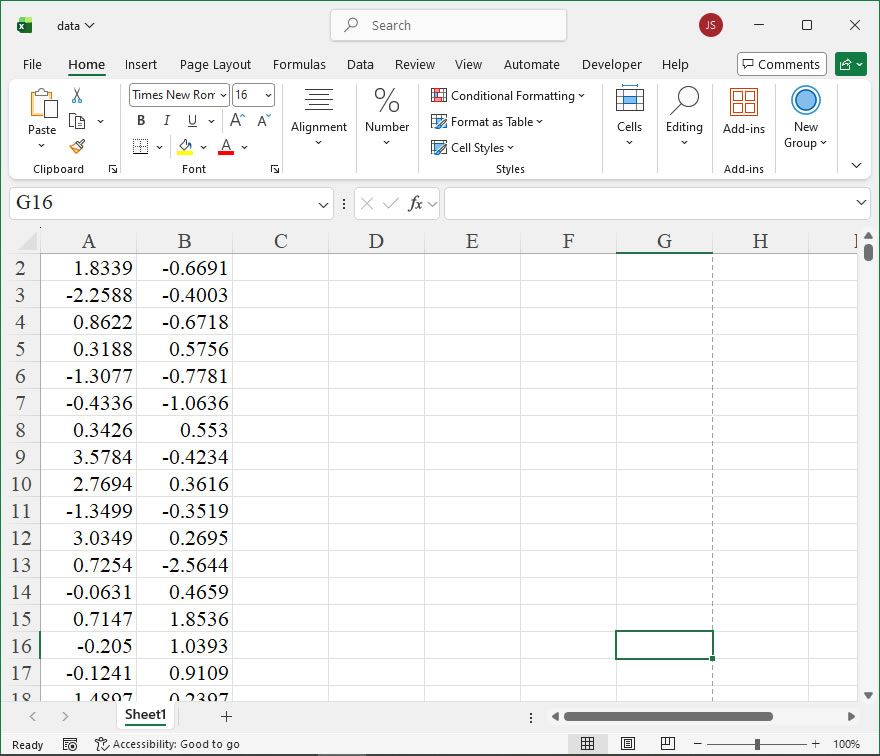
data=sht.range('B2:C101').value
app.kill()

from comtypes.client import CreateObject
app2=CreateObject("Excel.Application")
app2.Visible=True
wb2=app2.Workbooks.Open(root+r'/data.xlsx')
sht2=wb2.Sheets('Sheet1')

shp=sht2.Shapes.AddChart2()
shp.Left=20
cht=shp.Chart
cht.ChartType=-4169
ax1=cht.Axes(1)
ax2=cht.Axes(2)
ax1.MinimumScale=0
ax1.MaximumScale=7
ax2.MinimumScale=0
ax2.MaximumScale=0.35

set_style(cht)

cht.SeriesCollection().NewSeries()

count1=count2=count3=count4=count5=count6=0
d1=[];d2=[];d3=[];d4=[];d5=[];d6=[]
for i in range(100):
    if data[i][1]==1:
        count1+=1
        d1.append(data[i][0])
    elif data[i][1]==2:
        count2+=1
        d2.append(data[i][0])
    elif data[i][1]==3:
        count3+=1
        d3.append(data[i][0])
    elif data[i][1]==4:
        count4+=1
        d4.append(data[i][0])
    elif data[i][1]==5:
        count5+=1
        d5.append(data[i][0])
    elif data[i][1]==6:
        count6+=1
        d6.append(data[i][0])

draw_bar(cht,d1,count1,1,76,200,132,0.5,False)
draw_bar(cht,d2,count2,2,76,200,132,0.5,False)
draw_bar(cht,d3,count3,3,76,200,132,0.5,False)
draw_bar(cht,d4,count4,4,76,200,132,0.5,False)
draw_bar(cht,d5,count5,5,76,200,132,0.5,False)
draw_bar(cht,d6,count6,6,76,200,132,0.5,False)
    
draw_rnd_scatter(cht,1,d1,count1,0.5,192,0,0)
draw_rnd_scatter(cht,2,d2,count2,0.5,255,192,0)
draw_rnd_scatter(cht,3,d3,count3,0.5,146,208,80)
draw_rnd_scatter(cht,4,d4,count4,0.5,0,176,80)
draw_rnd_scatter(cht,5,d5,count5,0.5,0,176,240)
draw_rnd_scatter(cht,6,d6,count6,0.5,0,112,192)

#wb2.Save()
#os.system('taskkill /f /im EXCEL.EXE')

How To Create Custom Impact Chart Using xlwings?

Example

Code

import xlwings as xw
import numpy as np
import os

def set_style(cht):
    cht.ChartArea.Format.Line.Visible=False
    cht.PlotArea.Format.Fill.Visible = False
    cht.PlotArea.Format.Line.Visible = True
    cht.PlotArea.Format.Line.ForeColor.RGB=xw.utils.rgb_to_int((200,200,200))
    #cht.PlotArea.Format.Line.ForeColor.ObjectThemeColor = msoThemeColorText1
    ax1 = cht.Axes(1)
    ax2 = cht.Axes(2)
    ax1.HasTitle = True
    ax1.AxisTitle.Text = 'Categories'
    ax1.AxisTitle.Font.Size = 10
    ax1.TickLabels.Font.Size = 8
    #ax1.TickLabels.NumberFormat = '0.00'
    ax1.HasMajorGridlines = False
    ax2.HasTitle = True
    ax2.AxisTitle.Text = 'Values'
    ax2.AxisTitle.Font.Size = 10
    ax2.TickLabels.Font.Size = 8
    ax2.HasMajorGridlines = False
    cht.HasTitle = True
    #cht.ChartTitle.Caption = 'Plot'
    #cht.ChartTitle.Font.Size = 12

def draw_poly_4(cht,pts,r,g,b,alpha):
    pt=[[0 for _ in range(2)] for _ in range(5)]
    pt[0][0]=shape_x(cht, pts[0][0])
    pt[0][1]=shape_y(cht, pts[0][1])
    pt[1][0]=shape_x(cht, pts[1][0])
    pt[1][1]=shape_y(cht, pts[1][1])
    pt[2][0]=shape_x(cht, pts[2][0])
    pt[2][1]=shape_y(cht, pts[2][1])
    pt[3][0]=shape_x(cht, pts[3][0])
    pt[3][1]=shape_y(cht, pts[3][1])
    pt[4][0]=pt[0][0]
    pt[4][1]=pt[0][1]
    shp=cht.Shapes.AddPolyline(pt)
    if alpha==0:
        shp.Fill.ForeColor.RGB=xw.utils.rgb_to_int((r,g,b))
    else:
        shp.Fill.Transparency=0.5
        shp.Fill.ForeColor.RGB=xw.utils.rgb_to_int((r,g,b))
    shp.Line.Visible=False


root=os.getcwd()
app=xw.App(visible=True,add_book=False)
wb=app.books.open(root+r'/data.xlsx',read_only=False)
sht=wb.sheets('Sheet1')
data=sht.range('B1:D6').value
app.kill()

from comtypes.client import CreateObject
app2=CreateObject("Excel.Application")
app2.Visible=True
app2.ScreenUpdating=False
wb2=app2.Workbooks.Open(root+r'/data.xlsx')
sht2=wb2.Sheets('Sheet1')

shp=sht2.Shapes.AddChart2()
shp.Left=20
cht=shp.Chart
cht.ChartType=-4169
ax1=cht.Axes(1)
ax2=cht.Axes(2)
ax1.MinimumScale=0
ax1.MaximumScale=7
ax2.MinimumScale=0
ax2.MaximumScale=0.9

set_style(cht)

cht.SeriesCollection().NewSeries()

dt=np.zeros([6,4])
for i in range(6):
    my_sum=0
    for j in range(3):
        #print(data[i][j])
        my_sum=my_sum+data[i][j]
        dt[i][j+1]=my_sum
colors=[[0,176,240],[146,208,80],[255,192,0]]

pts=np.zeros([4,2])
for i in range(6):
    for j in range(3):
        pts[0][0]=i+1-0.25
        pts[0][1]=dt[i][j]
        pts[1][0]=i+1+0.25
        pts[1][1]=dt[i][j]
        pts[2][0]=i+1+0.25
        pts[2][1]=dt[i][j+1]
        pts[3][0]=i+1-0.25
        pts[3][1]=dt[i][j+1]
        draw_poly_4(cht,pts,colors[j][0],colors[j][1],colors[j][2],0)

for i in range(5):
    for j in range(3):
        pts[0][0]=i+1+0.25
        pts[0][1]=dt[i][j]
        pts[1][0]=i+2-0.25
        pts[1][1]=dt[i+1][j]
        pts[2][0]=i+2-0.25
        pts[2][1]=dt[i+1][j+1]
        pts[3][0]=i+1+0.25
        pts[3][1]=dt[i][j+1]
        draw_poly_4(cht,pts,colors[j][0],colors[j][1],colors[j][2],1)

app2.ScreenUpdating=True

#wb2.Save()
#os.system('taskkill /f /im EXCEL.EXE')

How To Create Custom Stacked Bar Chart Using xlwings?

Example

Code

import xlwings as xw
import numpy as np
import os

def set_style(cht):
    cht.ChartArea.Format.Line.Visible=False
    cht.PlotArea.Format.Fill.Visible = False
    cht.PlotArea.Format.Line.Visible = True
    cht.PlotArea.Format.Line.ForeColor.RGB=xw.utils.rgb_to_int((200,200,200))
    #cht.PlotArea.Format.Line.ForeColor.ObjectThemeColor = msoThemeColorText1
    ax1 = cht.Axes(1)
    ax2 = cht.Axes(2)
    ax1.HasTitle = True
    ax1.AxisTitle.Text = 'Categories'
    ax1.AxisTitle.Font.Size = 10
    ax1.TickLabels.Font.Size = 8
    #ax1.TickLabels.NumberFormat = '0.00'
    ax1.HasMajorGridlines = False
    ax2.HasTitle = True
    ax2.AxisTitle.Text = 'Values'
    ax2.AxisTitle.Font.Size = 10
    ax2.TickLabels.Font.Size = 8
    ax2.HasMajorGridlines = False
    cht.HasTitle = True
    #cht.ChartTitle.Caption = 'Plot'
    #cht.ChartTitle.Font.Size = 12

def draw_poly_4(cht,pts,r,g,b):

    pt=[[0 for _ in range(2)] for _ in range(5)]
    pt[0][0]=shape_x(cht, pts[0][0])
    pt[0][1]=shape_y(cht, pts[0][1])
    pt[1][0]=shape_x(cht, pts[1][0])
    pt[1][1]=shape_y(cht, pts[1][1])
    pt[2][0]=shape_x(cht, pts[2][0])
    pt[2][1]=shape_y(cht, pts[2][1])
    pt[3][0]=shape_x(cht, pts[3][0])
    pt[3][1]=shape_y(cht, pts[3][1])
    pt[4][0]=pt[0][0]
    pt[4][1]=pt[0][1]
    shp=cht.Shapes.AddPolyline(pt)
    shp.Fill.ForeColor.RGB=xw.utils.rgb_to_int((r,g,b))
    #shp.Fill.Transparency=0.5
    #shp.Line.ForeColor.RGB=xw.utils.rgb_to_int((r,g,b))
    #shp.Line.Weight=1.5
    shp.Line.Visible=False


root=os.getcwd()
app=xw.App(visible=True,add_book=False)
wb=app.books.open(root+r'/data.xlsx',read_only=False)
sht=wb.sheets('Sheet1')
data=sht.range('B1:D6').value
app.kill()

from comtypes.client import CreateObject
app2=CreateObject("Excel.Application") 
app2.Visible=True
app2.ScreenUpdating=False
wb2=app2.Workbooks.Open(root+r'/data.xlsx')
sht2=wb2.Sheets('Sheet1')

shp=sht2.Shapes.AddChart2()
shp.Left=20
cht=shp.Chart
cht.ChartType=-4169
ax1=cht.Axes(1)
ax2=cht.Axes(2)
ax1.MinimumScale=0
ax1.MaximumScale=7
ax2.MinimumScale=0
ax2.MaximumScale=0.9

set_style(cht)

cht.SeriesCollection().NewSeries()

dt=np.zeros([6,4])
for i in range(6):
    my_sum=0
    for j in range(3):
        #print(data[i][j])
        my_sum=my_sum+data[i][j]
        dt[i][j+1]=my_sum
colors=[[0,176,240],[146,208,80],[255,192,0]]

pts=np.zeros([4,2])
for i in range(6):
    for j in range(3):
        pts[0][0]=i+1-0.25
        pts[0][1]=dt[i][j]
        pts[1][0]=i+1+0.25
        pts[1][1]=dt[i][j]
        pts[2][0]=i+1+0.25
        pts[2][1]=dt[i][j+1]
        pts[3][0]=i+1-0.25
        pts[3][1]=dt[i][j+1]
        draw_poly_4(cht,pts,colors[j][0],colors[j][1],colors[j][2])

app2.ScreenUpdating=True

#wb2.Save()
#os.system('taskkill /f /im EXCEL.EXE')

How To Set Vector Format Output Using xlwings?

Example

import xlwings as xw
import os

def set_style(cht):
    cht.ChartArea.Format.Line.Visible=False
    cht.PlotArea.Format.Fill.Visible=False
    cht.PlotArea.Format.Line.Visible=True
    cht.PlotArea.Format.Line.ForeColor.RGB=xw.utils.rgb_to_int((200,200,200))
    #cht.PlotArea.Format.Line.ForeColor.ObjectThemeColor = msoThemeColorText1
    ax1=cht.Axes(1)
    ax2=cht.Axes(2)
    ax1.HasTitle=True
    ax1.AxisTitle.Text='Categories'
    ax1.AxisTitle.Font.Size=10
    ax1.TickLabels.Font.Size=8
    #ax1.TickLabels.NumberFormat='0.00'
    ax1.HasMajorGridlines=False
    ax2.HasTitle=True
    ax2.AxisTitle.Text='Values'
    ax2.AxisTitle.Font.Size=10
    ax2.TickLabels.Font.Size=8
    ax2.HasMajorGridlines=False
    cht.HasTitle=True
    #cht.ChartTitle.Caption='Plot'
    #cht.ChartTitle.Font.Size=12

root=os.getcwd()
app=xw.App(visible=True,add_book=False)
wb=app.books.open(root+r'/data.xlsx',read_only=False)
sht=wb.sheets('Sheet1')

sht.api.Range('A2:C11').Select()
shp=sht.api.Shapes.AddChart2(-1,xw.constants.ChartType.xlColumnClustered,20,20,350,250,True)
cht=shp.Chart

set_style(cht)

#wb.save()
#app.kill()
How To Save Chart as a Bitmap Image Using xlwings?

Example

import xlwings as xw
import os

def set_style(cht):
    cht.ChartArea.Format.Line.Visible=False
    cht.PlotArea.Format.Fill.Visible=False
    cht.PlotArea.Format.Line.Visible=True
    cht.PlotArea.Format.Line.ForeColor.RGB=xw.utils.rgb_to_int((200,200,200))
    #cht.PlotArea.Format.Line.ForeColor.ObjectThemeColor = msoThemeColorText1
    ax1=cht.Axes(1)
    ax2=cht.Axes(2)
    ax1.HasTitle=True
    ax1.AxisTitle.Text='Categories'
    ax1.AxisTitle.Font.Size=10
    ax1.TickLabels.Font.Size=8
    #ax1.TickLabels.NumberFormat='0.00'
    ax1.HasMajorGridlines=False
    ax2.HasTitle=True
    ax2.AxisTitle.Text='Values'
    ax2.AxisTitle.Font.Size=10
    ax2.TickLabels.Font.Size=8
    ax2.HasMajorGridlines=False
    cht.HasTitle=True
    #cht.ChartTitle.Caption='Plot'
    #cht.ChartTitle.Font.Size=12

root=os.getcwd()
app=xw.App(visible=True,add_book=False)
wb=app.books.open(root+r'/data.xlsx',read_only=False)
sht=wb.sheets('Sheet1')

sht.api.Range('A2:C8').Select()
shp=sht.api.Shapes.AddChart2(-1,xw.constants.ChartType.xlColumnClustered,20,20,350,250,True)
cht=shp.Chart

set_style(cht)

#wb.save()
#app.kill()
How To Set Chart Size & Font Using xlwings?

Example

Code

import xlwings as xw
import os

def set_style(cht):
    cht.ChartArea.Format.Line.Visible=False
    cht.PlotArea.Format.Fill.Visible=False
    cht.PlotArea.Format.Line.Visible=True
    cht.PlotArea.Format.Line.ForeColor.RGB=xw.utils.rgb_to_int((200,200,200))
    #cht.PlotArea.Format.Line.ForeColor.ObjectThemeColor = msoThemeColorText1
    ax1=cht.Axes(1)
    ax2=cht.Axes(2)
    ax1.HasTitle=True
    ax1.AxisTitle.Text='Categories'
    ax1.AxisTitle.Font.Size=10
    ax1.TickLabels.Font.Size=8
    #ax1.TickLabels.NumberFormat='0.00'
    ax1.HasMajorGridlines=False
    ax2.HasTitle=True
    ax2.AxisTitle.Text='Values'
    ax2.AxisTitle.Font.Size=10
    ax2.TickLabels.Font.Size=8
    ax2.HasMajorGridlines=False
    cht.HasTitle=True
    #cht.ChartTitle.Caption='Plot'
    #cht.ChartTitle.Font.Size=12

root=os.getcwd()
app=xw.App(visible=True,add_book=False)
wb=app.books.open(root+r'/data.xlsx',read_only=False)
sht=wb.sheets('Sheet1')

sht.api.Range('A2:C11').Select()
shp=sht.api.Shapes.AddChart2(-1,xw.constants.ChartType.xlColumnClustered,20,20,400,300,True)
cht=shp.Chart
shp.Left=300
shp.Top=30
shp.Width=300
shp.Height=200

set_style(cht)

#wb.save()
#app.kill()
How To Set Custom Styles Using xlwings?

Example

Code

import xlwings as xw
import os

def set_style(cht):
    cht.ChartArea.Format.Line.Visible=False
    cht.PlotArea.Format.Fill.Visible=False
    cht.PlotArea.Format.Line.Visible=True
    cht.PlotArea.Format.Line.ForeColor.RGB=xw.utils.rgb_to_int((200,200,200))
    #cht.PlotArea.Format.Line.ForeColor.ObjectThemeColor = msoThemeColorText1
    ax1=cht.Axes(1)
    ax2=cht.Axes(2)
    ax1.HasTitle=True
    ax1.AxisTitle.Text='Categories'
    ax1.AxisTitle.Font.Size=10
    ax1.TickLabels.Font.Size=8
    #ax1.TickLabels.NumberFormat='0.00'
    ax1.HasMajorGridlines=True
    ax2.HasTitle=True
    ax2.AxisTitle.Text='Values'
    ax2.AxisTitle.Font.Size=10
    ax2.TickLabels.Font.Size=8
    ax2.HasMajorGridlines=True
    cht.HasTitle=True
    #cht.ChartTitle.Caption='Plot'
    #cht.ChartTitle.Font.Size=12

root=os.getcwd()
app=xw.App(visible=True,add_book=False)
wb=app.books.open(root+r'/data.xlsx',read_only=False)
sht=wb.sheets('Sheet1')

sht.api.Range('A2:C8').Select()
shp=sht.api.Shapes.AddChart2(-1,xw.constants.ChartType.xlColumnClustered,20,20,350,250,True)
cht=shp.Chart
cht.SeriesCollection(1).ChartType=xw.constants.ChartType.xlLine

set_style(cht)

#wb.save()
#app.kill()