Archive

How To Set Built-in Styles for Excel Charts Using xlwings?

Example

Code

import xlwings as xw
import os

root=os.getcwd()
app=xw.App(visible=True,add_book=False)
wb=app.books.open(root+r'/data.xlsx',read_only=False)
sht=wb.sheets('Sheet1')

sht.api.Range('A2:C11').Select()
cht1=sht.api.Shapes.AddChart2(228,xw.constants.ChartType.xlLine,10,20,350,250,True).Chart
cht2=sht.api.Shapes.AddChart2(230,xw.constants.ChartType.xlLine,20,20,350,250,True).Chart
cht3=sht.api.Shapes.AddChart2(232,xw.constants.ChartType.xlLine,30,20,350,250,True).Chart
cht4=sht.api.Shapes.AddChart2(233,xw.constants.ChartType.xlLine,40,20,350,250,True).Chart

#wb.save()
#app.kill()

How To Create a Colorbar Using xlwings?

Method

Example

import xlwings as xw
import os

def set_style(cht):
    cht.ChartArea.Format.Line.Visible=False
    cht.PlotArea.Format.Fill.Visible=False
    cht.PlotArea.Format.Line.Visible=True
    cht.PlotArea.Format.Line.ForeColor.RGB=xw.utils.rgb_to_int((200,200,200))
    #cht.PlotArea.Format.Line.ForeColor.ObjectThemeColor = msoThemeColorText1
    ax1=cht.Axes(1)
    ax2=cht.Axes(2)
    ax1.HasTitle=True
    ax1.AxisTitle.Text='Categories'
    ax1.AxisTitle.Font.Size=10
    ax1.TickLabels.Font.Size=8
    #ax1.TickLabels.NumberFormat='0.00'
    ax1.HasMajorGridlines=False
    ax2.HasTitle=True
    ax2.AxisTitle.Text='Values'
    ax2.AxisTitle.Font.Size=10
    ax2.TickLabels.Font.Size=8
    ax2.HasMajorGridlines=False
    cht.HasTitle=True
    #cht.ChartTitle.Caption='Plot'
    #cht.ChartTitle.Font.Size=12

root=os.getcwd()
app=xw.App(visible=True,add_book=False)
wb=app.books.open(root+r'/data.xlsx',read_only=False)
sht=wb.sheets('Sheet1')

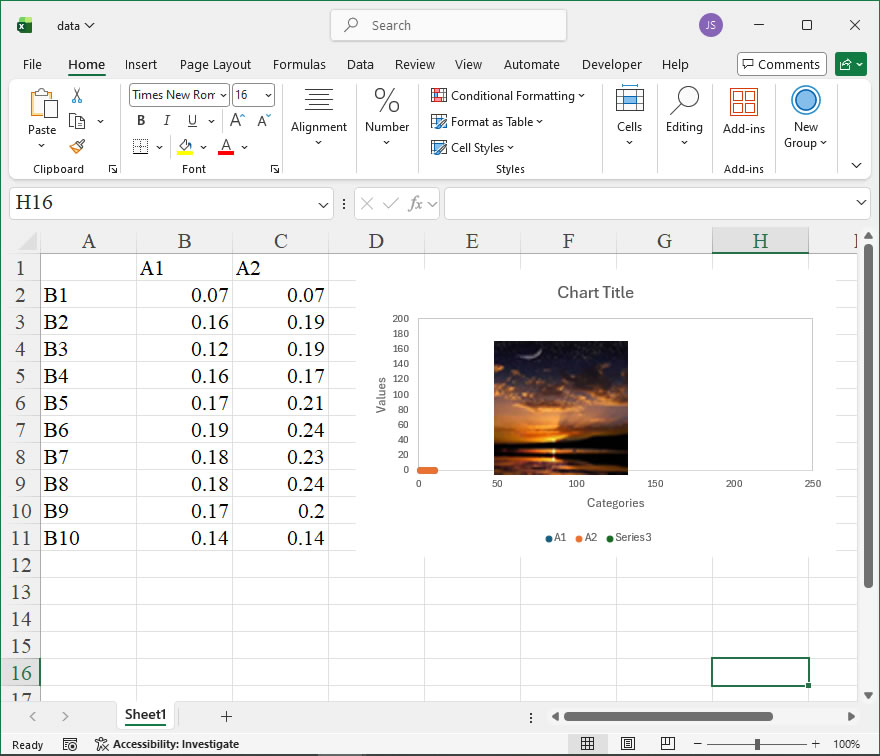
shp=sht.api.Shapes.AddChart2()
shp.Left=20
cht=shp.Chart
cht.ChartType=xw.constants.ChartType.xlXYScatter
ax1=cht.Axes(1)
ax2=cht.Axes(2)
ax1.MinimumScale=0
ax1.MaximumScale=300
ax2.MinimumScale=0
ax2.MaximumScale=300
  
set_style(cht)

cht.SeriesCollection().NewSeries()
  
x=shape_x(cht,50)
y=shape_y(cht,250)
w=cht.PlotArea.InsideWidth/(ax1.MaximumScale-ax1.MinimumScale)*10
h=cht.PlotArea.InsideHeight/(ax2.MaximumScale-ax2.MinimumScale)*200
shp2=cht.Shapes.AddShape(1,x,y,w,h)
shp2.Fill.ForeColor.RGB=xw.utils.rgb_to_int((255,255,26))
shp2.Fill.OneColorGradient(1,1,1)
shp2.Fill.GradientStops.Insert(xw.utils.rgb_to_int((255,204,51)),0.25)
shp2.Fill.GradientStops.Delete(2)
shp2.Fill.GradientStops.Insert(xw.utils.rgb_to_int((204,204,51)),0.5)
shp2.Fill.GradientStops.Insert(xw.utils.rgb_to_int((0,179,179)),0.75)
shp2.Fill.GradientStops.Insert(xw.utils.rgb_to_int((51,128,255)),0.85)
shp2.Fill.GradientStops.Insert(xw.utils.rgb_to_int((255,204,51)),1)
shp2.Line.Weight=1
cm_labels=['0','0.5','1']
cm_label_pos=[50,150,250]
for i in range(3):
    lf=shape_x(cht,57)
    tp=shape_y(cht,cm_label_pos[i]+20)
    wd=cht.PlotArea.InsideWidth/(cht.Axes(1).MaximumScale-cht.Axes(1).MinimumScale)*40
    ht=cht.PlotArea.InsideHeight/(cht.Axes(2).MaximumScale-cht.Axes(2).MinimumScale)*30
    shp6=cht.Shapes.AddLabel(1,lf,tp,wd,ht)
    shp6.TextFrame2.TextRange.Characters.Text=cm_labels[i]
    shp6.TextFrame2.TextRange.Characters.Font.Size=8
    shp6.TextFrame2.AutoSize=1    #msoAutoSizeTextToFitShape
  
x=shape_x(cht,110)
y=shape_y(cht,250)
w=cht.PlotArea.InsideWidth/(ax1.MaximumScale-ax1.MinimumScale)*10
h=cht.PlotArea.InsideHeight/(ax2.MaximumScale-ax2.MinimumScale)*200
shp3=cht.Shapes.AddShape(1,x,y,w,h)
shp3.Fill.ForeColor.RGB=xw.utils.rgb_to_int((255,0,255))
shp3.Fill.OneColorGradient(1,1,1)
shp3.Fill.GradientStops.Insert(xw.utils.rgb_to_int((0,255,255)),1)
shp3.Fill.GradientStops.Delete(2)
shp3.Line.Weight=1
for i in range(3):
    lf=shape_x(cht,117)
    tp=shape_y(cht,cm_label_pos[i]+20)
    wd=cht.PlotArea.InsideWidth/(cht.Axes(1).MaximumScale-cht.Axes(1).MinimumScale)*40
    ht=cht.PlotArea.InsideHeight/(cht.Axes(2).MaximumScale-cht.Axes(2).MinimumScale)*30
    shp6=cht.Shapes.AddLabel(1,lf,tp,wd,ht)
    shp6.TextFrame2.TextRange.Characters.Text=cm_labels[i]
    shp6.TextFrame2.TextRange.Characters.Font.Size=8
    shp6.TextFrame2.AutoSize=1    #msoAutoSizeTextToFitShape
  
x=shape_x(cht,170)
y=shape_y(cht,250)
w=cht.PlotArea.InsideWidth/(ax1.MaximumScale-ax1.MinimumScale)*10
h=cht.PlotArea.InsideHeight/(ax2.MaximumScale-ax2.MinimumScale)*200
shp4=cht.Shapes.AddShape(1,x,y,w,h)
shp4.Fill.ForeColor.RGB=xw.utils.rgb_to_int((255,255,102))
shp4.Fill.OneColorGradient(1,1,1)
shp4.Fill.GradientStops.Insert(xw.utils.rgb_to_int((0,128,102)),1)
shp4.Fill.GradientStops.Delete(2)
shp4.Line.Weight=1
for i in range(3):
    lf=shape_x(cht,177)
    tp=shape_y(cht,cm_label_pos[i]+20)
    wd=cht.PlotArea.InsideWidth/(cht.Axes(1).MaximumScale-cht.Axes(1).MinimumScale)*40
    ht=cht.PlotArea.InsideHeight/(cht.Axes(2).MaximumScale-cht.Axes(2).MinimumScale)*30
    shp6=cht.Shapes.AddLabel(1,lf,tp,wd,ht)
    shp6.TextFrame2.TextRange.Characters.Text=cm_labels[i]
    shp6.TextFrame2.TextRange.Characters.Font.Size=8
    shp6.TextFrame2.AutoSize=1    #msoAutoSizeTextToFitShape
  
x=shape_x(cht,230)
y=shape_y(cht,250)
w=cht.PlotArea.InsideWidth/(ax1.MaximumScale-ax1.MinimumScale)*10
h=cht.PlotArea.InsideHeight/(ax2.MaximumScale-ax2.MinimumScale)*200
shp5=cht.Shapes.AddShape(1,x,y,w,h)
shp5.Fill.ForeColor.RGB=xw.utils.rgb_to_int((128,0,0))
shp5.Fill.OneColorGradient(1,1,1)
shp5.Fill.GradientStops.Insert(xw.utils.rgb_to_int((255,0,0)),0.1)
shp5.Fill.GradientStops.Delete(2)
shp5.Fill.GradientStops.Insert(xw.utils.rgb_to_int((255,255,0)),0.39)
shp5.Fill.GradientStops.Insert(xw.utils.rgb_to_int((0,255,255)),0.65)
shp5.Fill.GradientStops.Insert(xw.utils.rgb_to_int((0,0,255)),0.89)
shp5.Fill.GradientStops.Insert(xw.utils.rgb_to_int((0,0,128)),1)
shp5.Line.Weight=1
for i in range(3):
    lf=shape_x(cht,237)
    tp=shape_y(cht,cm_label_pos[i]+20)
    wd=cht.PlotArea.InsideWidth/(cht.Axes(1).MaximumScale-cht.Axes(1).MinimumScale)*40
    ht=cht.PlotArea.InsideHeight/(cht.Axes(2).MaximumScale-cht.Axes(2).MinimumScale)*30
    shp6=cht.Shapes.AddLabel(1,lf,tp,wd,ht)
    shp6.TextFrame2.TextRange.Characters.Text=cm_labels[i]
    shp6.TextFrame2.TextRange.Characters.Font.Size=8
    shp6.TextFrame2.AutoSize=1    #msoAutoSizeTextToFitShape

#wb.save()
#app.kill()

How To Use a Colormap Using xlwings?

Method

NameDescriptionColor Bar
parulaGradient between blue, cyan, orange, and yellow
turboGradient between blue and red
hsvHue component variation in the HSV color model
hotGradient between black, red, orange, yellow, and white
coolGradient between cyan and magenta
springGradient between magenta and yellow
summerGradient between green and yellow
autumnGradient from red to orange-yellow, yellow
winterGradient between blue and green
grayLinear grayscale color lookup table
boneGray color lookup table with a higher blue component
copperGradient between black and bright copper
pinkGradient between magenta and white
skyGradient between white and sky blue
abyssGradient between deep blue and sky blue
jetGradient between blue, cyan, yellow, orange-red, and red

Example

import xlwings as xw
import os

def set_style(cht):
    cht.ChartArea.Format.Line.Visible=False
    cht.PlotArea.Format.Fill.Visible=False
    cht.PlotArea.Format.Line.Visible=True
    cht.PlotArea.Format.Line.ForeColor.RGB=xw.utils.rgb_to_int((200,200,200))
    #cht.PlotArea.Format.Line.ForeColor.ObjectThemeColor = msoThemeColorText1
    ax1=cht.Axes(1)
    ax2=cht.Axes(2)
    ax1.HasTitle=True
    ax1.AxisTitle.Text='Categories'
    ax1.AxisTitle.Font.Size=10
    ax1.TickLabels.Font.Size=8
    #ax1.TickLabels.NumberFormat='0.00'
    ax1.HasMajorGridlines=False
    ax2.HasTitle=True
    ax2.AxisTitle.Text='Values'
    ax2.AxisTitle.Font.Size=10
    ax2.TickLabels.Font.Size=8
    ax2.HasMajorGridlines=False
    cht.HasTitle=True
    #cht.ChartTitle.Caption='Plot'
    #cht.ChartTitle.Font.Size=12

root=os.getcwd()
app=xw.App(visible=True,add_book=False)
wb=app.books.open(root+r'/data.xlsx',read_only=False)
sht=wb.sheets('Sheet1')

sht.api.Range('A2:B9').Select()
shp=sht.api.Shapes.AddChart2(-1,xw.constants.ChartType.xlColumnClustered,20,20,350,250,True)
cht=shp.Chart
cht.ChartGroups(1).GapWidth=50

cm=wb.sheets('parula').range('A1:C256').value

for i in range(8):
    count=int((i+1)/8*256)
    if count==256:
      r=int(cm[255][0])
      g=int(cm[255][1])
      b=int(cm[255][2])
    else:
      r=int(cm[count][0])
      g=int(cm[count][1])
      b=int(cm[count][2])

    cht.SeriesCollection(1).Points(i+1).Format.Fill. \
    ForeColor.RGB=xw.utils.rgb_to_int((r,g,b))

set_style(cht)

#wb.save()
#app.kill()
How To Color a Group of Objects Using xlwings?

Example

Code

import xlwings as xw
import os

def set_style(cht):
    cht.ChartArea.Format.Line.Visible=False
    cht.PlotArea.Format.Fill.Visible=False
    cht.PlotArea.Format.Line.Visible=True
    cht.PlotArea.Format.Line.ForeColor.RGB=xw.utils.rgb_to_int((200,200,200))
    #cht.PlotArea.Format.Line.ForeColor.ObjectThemeColor = msoThemeColorText1
    ax1=cht.Axes(1)
    ax2=cht.Axes(2)
    ax1.HasTitle=True
    ax1.AxisTitle.Text='Categories'
    ax1.AxisTitle.Font.Size=10
    ax1.TickLabels.Font.Size=8
    #ax1.TickLabels.NumberFormat='0.00'
    ax1.HasMajorGridlines=False
    ax2.HasTitle=True
    ax2.AxisTitle.Text='Values'
    ax2.AxisTitle.Font.Size=10
    ax2.TickLabels.Font.Size=8
    ax2.HasMajorGridlines=False
    cht.HasTitle=True
    #cht.ChartTitle.Caption='Plot'
    #cht.ChartTitle.Font.Size=12

root=os.getcwd()
app=xw.App(visible=True,add_book=False)
wb=app.books.open(root+r'/data.xlsx',read_only=False)
sht=wb.sheets('Sheet1')

sht.api.Range('A1:B4').Select()
shp=sht.api.Shapes.AddChart2(-1,xw.constants.ChartType.xlColumnClustered,20,20,350,250,True)
cht=shp.Chart

cht.ChartGroups(1).GapWidth=100
  
colors=[[51,51,0],
        [102,102,0],
        [153,153,0],
        [204,204,0]]
for i in range(4):
    cht.SeriesCollection(1).Points(i+1).Format.Fill.ForeColor.RGB \
    = xw.utils.rgb_to_int((colors[i][0],colors[i][1],colors[i][2]))

set_style(cht)

#wb.save()
#app.kill()