Method
To draw polylines, polygons, and curves with xlwings, there are some issues. Use another Python package called `comtypes`, which is based on COM, similar to xlwings.
First, install the `comtypes` library using the `pip` command in the DOS command window:
pip install comtypes
Then, enter the following in the Python IDLE window:
#Import the CreateObject function from comtypes
from comtypes.client import CreateObject
app2=CreateObject(“Excel.Application”) #Create Excel application
app2.Visible=True #Make the application window visible
bk2=app2.Workbooks.Add() #Add a workbook
sht2=bk2.Sheets(1) #Get the first sheet
pts=[[10,10], [50,150],[90,80], [70,30], [10,10]] #Polygon vertices
sht2.Shapes.AddPolyline(pts) #Add polygon region
Sample Code
#Set to manual calculation

from xlwings import constants as con
import xlwings as xw    #Import the xlwings package
import os    #Import the os package

root = os.getcwd()    #Get the current path
#Create an Excel application window, visible,
#without opening a workbook
app=xw.App(visible=True, add_book=False)
#Open a data file, writable
bk=app.books.open(fullname=root+r'\Formula2.xlsx',read_only=False)
sht=bk.api.Sheets(1)    #Get the worksheet

#Set to manual calculation
app.api.Calculation=con.Calculation.xlCalculationManual

#bk.save()
#bk.close()
#app.kill()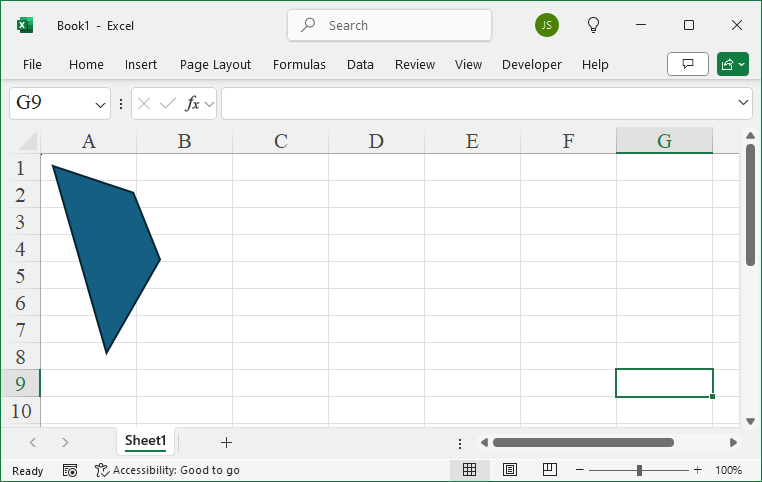
Leave a Reply