Method
|
Name |
Value |
Description |
|
xlThemeColorAccent1 |
5 |
Accent1 |
|
xlThemeColorAccent2 |
6 |
Accent2 |
|
xlThemeColorAccent3 |
7 |
Accent3 |
|
xlThemeColorAccent4 |
8 |
Accent4 |
|
xlThemeColorAccent5 |
9 |
Accent5 |
|
xlThemeColorAccent6 |
10 |
Accent6 |
|
xlThemeColorDark1 |
1 |
Dark1 |
|
xlThemeColorDark2 |
3 |
Dark2 |
|
xlThemeColorFollowedHyperlink |
12 |
Followed hyperlink |
|
xlThemeColorHyperlink |
11 |
Hyperlink |
|
xlThemeColorLight1 |
2 |
Light1 |
|
xlThemeColorLight2 |
4 |
Light2 |
shp=sht.api.Shapes.AddShape(9, 50, 50, 100, 100)
shp.Fill.ForeColor.ObjectThemeColor=10
shp.Line.ForeColor.ObjectThemeColor=3
Sample Code
#Color - Theme color

import xlwings as xw    #Import xlwings package

app=xw.App()
bk=app.books.active   #Get the active workbook
sht=bk.sheets.active    #Get the active worksheet

shp=sht.api.Shapes.AddShape(9, 50, 50, 100, 100)
shp.Fill.ForeColor.ObjectThemeColor=10
shp.Line.ForeColor.ObjectThemeColor=3

#bk.save()
#bk.close()
#app.kill()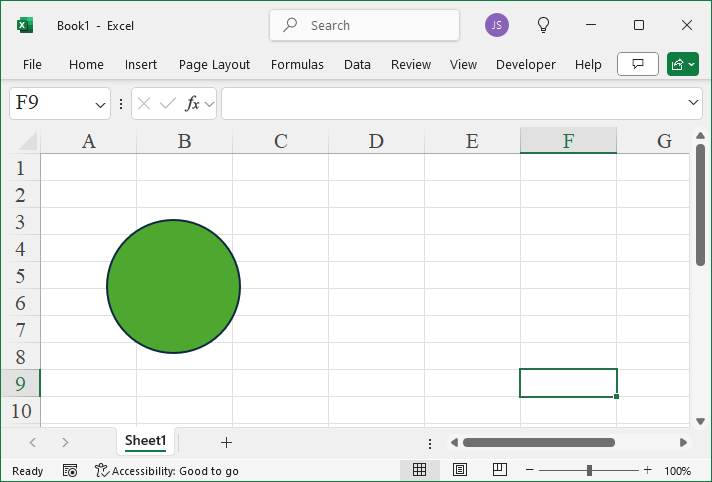
Leave a Reply