Method
Use the `AddTextEffect` method of the `Shapes` object to create WordArt. The syntax is:
sht.api.Shapes.AddTextEffect(PresetTextEffect,Text,FontName,FontSize,FontBold,FontItalic, Left, Top)
Where `sht` is the current worksheet. The parameters are explained in the table below.
|
Name |
Required/Optional |
Data Type |
Description |
|
PresetTextEffect |
Required |
MsoPresetTextEffect |
Predefined text effect |
|
Text |
Required |
String |
Text for WordArt |
|
FontName |
Required |
String |
Font name used for WordArt |
|
FontSize |
Required |
Single |
Font size (in points) used in WordArt |
|
FontBold |
Required |
MsoTriState |
Whether the font is bold |
|
FontItalic |
Required |
MsoTriState |
Whether the font is italic |
|
Left |
Required |
Single |
Horizontal coordinate of the upper-left corner |
|
Top |
Required |
Single |
Vertical coordinate of the upper-left corner |
|
Name |
Value |
Description |
|
msoTextEffect1 |
0 |
First text effect |
|
msoTextEffect2 |
1 |
Second text effect |
|
msoTextEffect3 |
2 |
Third text effect |
|
…… |
|
|
sht.api.Shapes.AddTextEffect(9,’Learn Python’,’Arial Black’,36,False,False,10,10)
sht.api.Shapes.AddTextEffect(29,’xlwings’,’Times New Roman’,40,False,False,30,50)
Sample Code
#Drawing WordArt

import xlwings as xw    #Import xlwings package

app=xw.App()
bk=app.books.active   #Get the active workbook
sht=bk.sheets.active    #Get the active worksheet

sht.api.Shapes.AddTextEffect(9,'Learn Python','Arial Black',36,False,False,10,10)
sht.api.Shapes.AddTextEffect(29,'xlwings','Times New Roman',40,False,False,30,50)

#bk.save()
#bk.close()
#app.kill()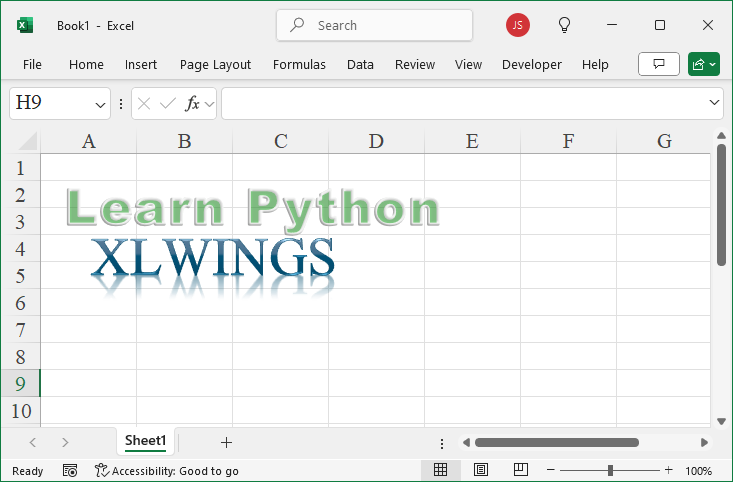
Leave a Reply