Method
The Shapes object does not provide a specific method to draw points, but it offers several special shapes that can represent points, such as stars, rectangles, circles, diamonds, etc. These AutoShapes can be created using the `AddShape` method of the Shapes object. The method syntax is:
sht.api.Shapes.AddShape(Type, Left, Top, Width, Height)
Using the xlwings package API call. `sht` refers to a worksheet object. This method returns a Shape object. The parameters are as follows:
|
Name |
Required/Optional |
Data Type |
Description |
|
Type |
Required |
MsoAutoShapeType |
The type of AutoShape to create |
|
Left |
Required |
Single |
Position of the shape’s top-left corner relative to the document’s top-left corner (in points) |
|
Top |
Required |
Single |
Position of the shape’s top-left corner relative to the document’s top (in points) |
|
Width |
Required |
Single |
Width of the shape’s border (in points) |
|
Height |
Required |
Single |
Height of the shape’s border (in points) |
|
Name |
Value |
Description |
|
msoShape10pointStar |
149 |
10-point star |
|
msoShape12pointStar |
150 |
12-point star |
|
msoShape16pointStar |
94 |
16-point star |
|
msoShape24pointStar |
95 |
24-point star |
|
msoShape32pointStar |
96 |
32-point star |
|
msoShape4pointStar |
91 |
4-point star |
|
msoShape5pointStar |
92 |
5-point star |
|
msoShape6pointStar |
147 |
6-point star |
sht.api.Shapes.AddShape(92,180,80,10,10)
sht.api.Shapes.AddShape(150,150,40,15,15)
sht.api.Shapes.AddShape(96,80,80,3,3)
Sample Code
#Find cells containing formulas

import xlwings as xw    #Import the xlwings package
from xlwings import constants as con
import os    #Import the os package

root = os.getcwd()    #Get the current path
#Create an Excel application window, visible,
#without opening a workbook
app=xw.App(visible=True, add_book=False)
#Open a data file, writable
bk=app.books.open(fullname=root+r'\Formula2.xlsx',read_only=False)
sht=bk.api.Sheets(1)    #Get the worksheet

#Find cells containing formulas
rng=sht.Range('B3:E5').SpecialCells(con.CellType.xlCellTypeFormulas)
rng.Select()

#bk.save()
#bk.close()
#app.kill()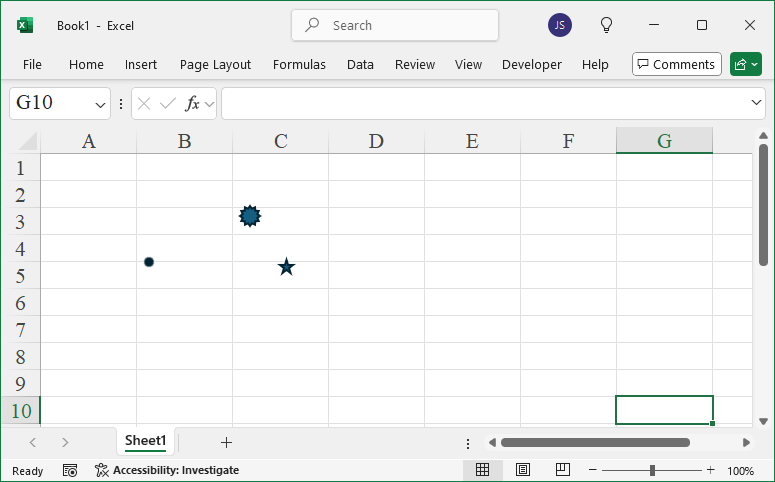
Leave a Reply