Method
In Excel, line objects are represented by the `LineFormat` object. The `Line` property of a `Shape` object returns a `LineFormat` object. For example, a straight line, the borders of a rectangle, and a circular region are all represented as `LineFormat` objects.
Once you have the `LineFormat` object, you can use its properties and methods to set various attributes like color, line style, line width, arrows, transparency, and pattern fill.
shp=sht.api.Shapes.AddLine(20, 20, 100, 120)
lf=shp.Line
lf.ForeColor.RGB=xw.utils.rgb_to_int((255,0,0)) #Red
lf.DashStyle=5 #Line style, dotted line
lf.Weight=3 #Line width
shp2=sht.api.Shapes.AddShape(9, 200, 30, 120, 80)
#Line shape in elliptical area, i.e., the boundary of the area
lf2=shp2.Line
lf2.ForeColor.RGB=xw.utils.rgb_to_int((255,0,0)) #Red
lf2.DashStyle=3 #Line style, dotted line with circles
lf2.Weight=4 #Line width
Sample Code
#Line properties

import xlwings as xw    #Import xlwings package

app=xw.App()
bk=app.books.active   #Get the active workbook
sht=bk.sheets.active    #Get the active worksheet

shp=sht.api.Shapes.AddLine(20, 20, 100, 120)
lf=shp.Line
lf.ForeColor.RGB=xw.utils.rgb_to_int((255,0,0))    #Red
lf.DashStyle=5    #Line style, dotted line
lf.Weight=3    #Line width

shp2=sht.api.Shapes.AddShape(9, 200, 30, 120, 80)
#Line shape in elliptical area, i.e., the boundary of the area
lf2=shp2.Line
lf2.ForeColor.RGB=xw.utils.rgb_to_int((255,0,0))    #Red
lf2.DashStyle=3    #Line style, dotted line with circles
lf2.Weight=4    #Line width

#bk.save()
#bk.close()
#app.kill()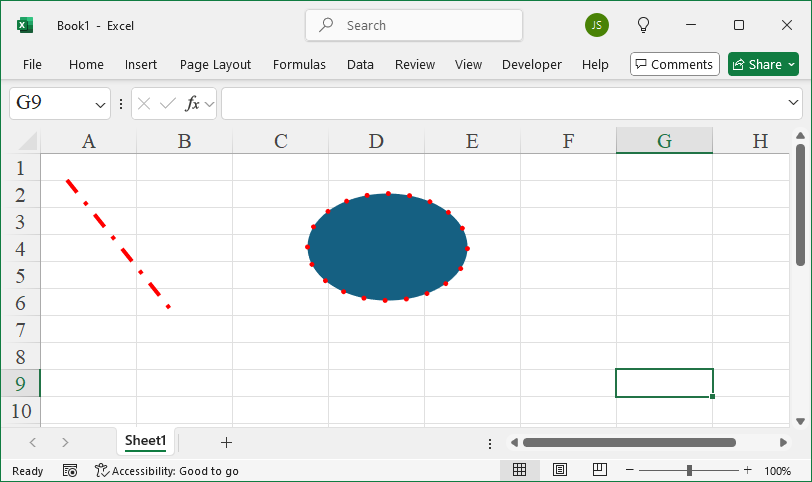
Leave a Reply