Method
AutoShapes are predefined shapes in Excel. Use the `AddShape` method of the `Shapes` object to create AutoShapes.
|
Name |
Value |
Description |
|
msoShapeOval |
9 |
Oval |
|
msoShapeOvalCallout |
107 |
Oval callout |
|
msoShapeParallelogram |
12 |
Slanted parallelogram |
|
msoShapePie |
142 |
Pie (sector) missing parts |
|
msoShapeQuadArrow |
39 |
Arrows pointing up, down, left, right |
|
msoShapeQuadArrowCallout |
59 |
Callout with directional arrows |
|
msoShapeRectangle |
1 |
Rectangle |
|
msoShapeRectangularCallout |
105 |
Rectangular callout |
|
msoShapeRightArrow |
33 |
Right arrow |
|
msoShapeRightArrowCallout |
53 |
Callout with right arrow |
|
msoShapeRightBrace |
32 |
Right brace |
|
msoShapeRightBracket |
30 |
Right bracket |
|
msoShapeRightTriangle |
utf-8 |
Right-angle triangle |
|
msoShapeRound1Rectangle |
151 |
Rectangle with one rounded corner |
|
msoShapeRound2DiagRectangle |
157 |
Rectangle with two rounded corners diagonally opposite |
|
msoShapeRound2SameRectangle |
152 |
Rectangle with two rounded corners on the same side |
|
msoShapeRoundedRectangle |
5 |
Rounded rectangle |
|
msoShapeRoundedRectangularCallout |
106 |
Rounded rectangular callout |
|
…… |
|
|
sht.api.Shapes.AddShape(1, 50, 50, 100, 200)
sht.api.Shapes.AddShape(12, 250, 50, 100, 100)
sht.api.Shapes.AddShape(17, 450, 50, 100, 100)
Sample Code
#Drawing shapes

import xlwings as xw    #Import xlwings package

app=xw.App()
bk=app.books.active   #Get the active workbook
sht=bk.sheets.active    #Get the active worksheet

sht.api.Shapes.AddShape(1, 50, 50, 100, 200)
sht.api.Shapes.AddShape(12, 250, 50, 100, 100)
sht.api.Shapes.AddShape(17, 450, 50, 100, 100)

#bk.save()
#bk.close()
#app.kill()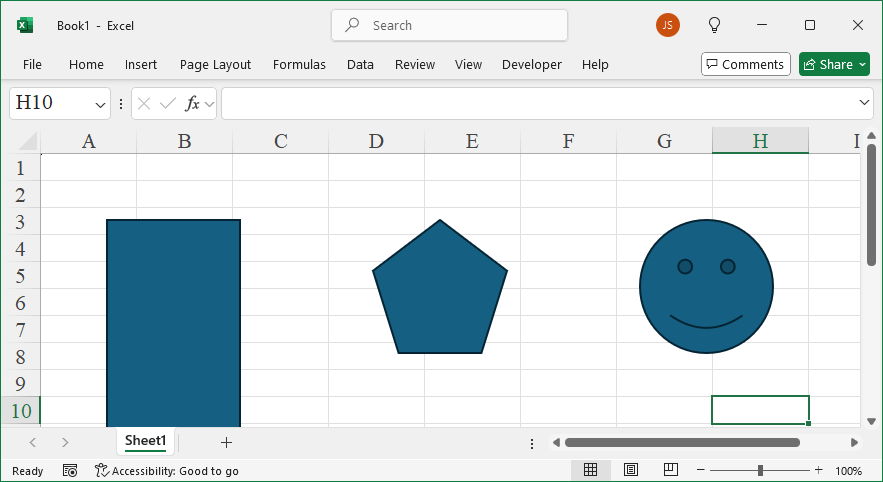
Leave a Reply