Method
Use the `OneColorGradient` method of the `FillFormat` object for single-color gradient fills. A single-color gradient fill involves a variation of a single color’s intensity.
ff.OneColorGradient(Style, Variant, Degree)
|
Name |
Required/Optional |
Data Type |
Description |
|
Style |
Required |
MsoGradientStyle |
Gradient style |
|
Variant |
Required |
Integer |
Gradient variant (1 to 4) |
|
Degree |
Required |
Single |
Degree of gradient (0.0 – dark to 1.0 – light) |
shp1=sht.api.Shapes.AddShape(1, 100, 50, 200, 100) #Rectangular area
ff1=shp1.Fill
ff1.ForeColor.RGB= xw.utils.rgb_to_int((255,0,0))
#Solid gradient fill, white to red, gradient from bottom-right to top-left
ff1.OneColorGradient(3, 1, 1)
Sample Code
#Area properties - Two Color Gradient fill

import xlwings as xw    #Import xlwings package

app=xw.App()
bk=app.books.active   #Get the active workbook
sht=bk.sheets.active    #Get the active worksheet

shp1=sht.api.Shapes.AddShape(1, 100, 50, 200, 100)    #Rectangular area
ff1=shp1.Fill
ff1.ForeColor.RGB= xw.utils.rgb_to_int((255,0,0))    #Start color
ff1.TwoColorGradient(3, 1)    #Two-color gradient fill
ff1.BackColor.RGB= xw.utils.rgb_to_int((0, 255,0))    #End color

shp2=sht.api.Shapes.AddShape(9, 400, 50, 200, 100)    #Elliptical area
ff2=shp2.Fill
ff2.ForeColor.RGB= xw.utils.rgb_to_int((0,0,255))    #Start color
ff2.TwoColorGradient(3, 1)    #Two-color gradient fill
ff2.BackColor.RGB= xw.utils.rgb_to_int((0, 255,0))    #End color

#bk.save()
#bk.close()
#app.kill()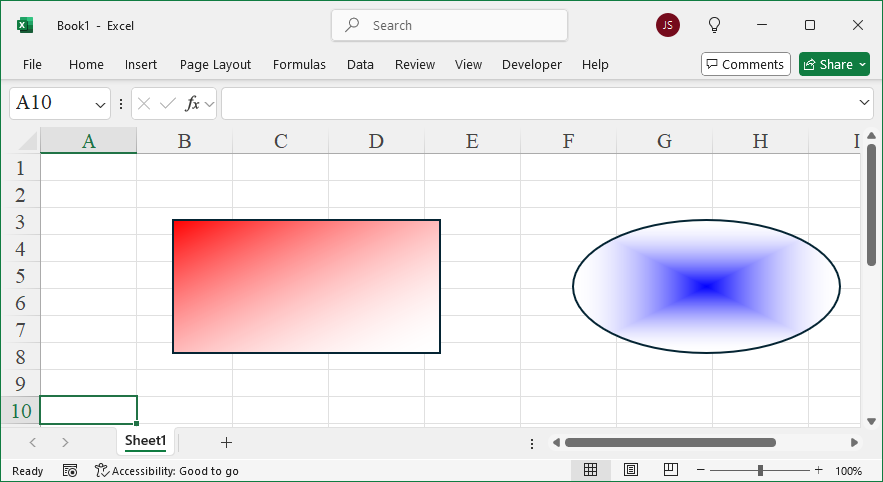
Leave a Reply